

Apple Watch Mod Case: The Complete Beginner’s Guide
The Apple Watch is one of the most useful devices you can wear, but its familiar rectangular design may not suit every personal style.
An Apple Watch mod case changes the exterior appearance of your Apple Watch by placing it inside a specially designed conversion case. Depending on the design, the finished watch can take on the appearance of a traditional sports watch, integrated-bracelet watch or luxury-inspired timepiece while retaining the everyday functions of the Apple Watch.
For first-time buyers, choosing the right mod case can be confusing. Different cases use different materials, installation systems, straps and compatible Apple Watch sizes.
This complete beginner’s guide explains:
- What an Apple Watch mod case is
- How a mod case works
- The difference between a mod case and a normal protective case
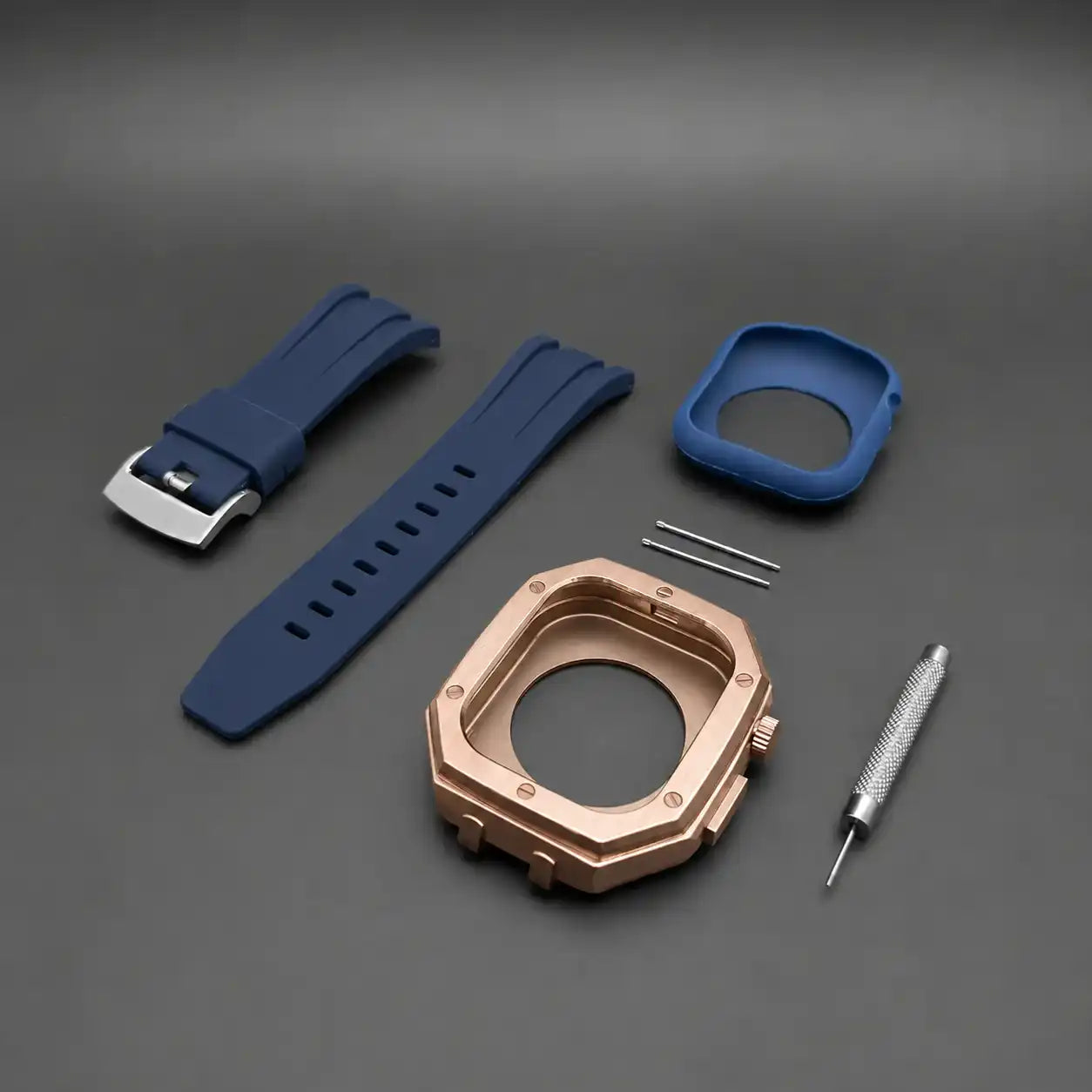
- What is usually included in a mod kit
- How to choose the correct size
- Whether the case affects Apple Watch functions
- How installation works
- Which materials and styles are available
- What to check before purchasing
What Is an Apple Watch Mod Case?
An Apple Watch mod case is a conversion case designed to change the overall shape, proportions and appearance of an Apple Watch.
Unlike a simple snap-on cover, a full mod case usually surrounds the Apple Watch body and integrates it into a larger watch-style structure. Many mod cases are paired with a matching bracelet or strap, creating the appearance of a complete wristwatch rather than an Apple Watch with an added cover.
An Apple Watch mod case may also be described as an:
- Apple Watch mod kit
- Apple Watch conversion case
- Apple Watch case mod
- Luxury Apple Watch case
- Apple Watch transformation kit
- Apple Watch custom case
- Apple Watch case and band set
Although the terminology varies, the purpose is generally the same: to transform the physical appearance of the Apple Watch without modifying its internal hardware or software.
How Does an Apple Watch Mod Case Work?
The original Apple Watch is placed inside the mod case.
Depending on the product, the case may use:
- A soft internal protective lining
- A silicone or rubber mounting insert
- Small screws
- A removable caseback
- A locking frame
- An integrated metal bracelet
- A removable rubber or silicone strap
The internal insert holds the Apple Watch in position and helps prevent direct metal-to-metal contact.
Openings in the case are positioned around important Apple Watch components, including:
- The Digital Crown
- Side button
- Speaker
- Microphone
- Charging area
- Display
- Strap connection area
Once installed correctly, the Apple Watch remains functional while gaining a completely different external design.
Apple Watch Mod Case vs Regular Protective Case
A mod case and a normal Apple Watch protective case are not the same product.
A Regular Protective Case
A standard protective case is mainly designed to reduce scratches, minor impacts and everyday wear.
It usually:
- Clips over the Apple Watch
- Uses plastic, TPU or silicone
- Keeps the original Apple Watch shape
- Adds very little weight
- Does not normally include a strap
- Can usually be removed in seconds
An Apple Watch Mod Case
A mod case is primarily designed to change the overall appearance of the watch.
It usually:
- Surrounds the Apple Watch body
- Changes the size and shape of the watch
- Includes a matching bracelet or strap
- Uses metal, rubber or composite materials
- Requires a more structured installation
- Creates a traditional wristwatch appearance
Some mod cases can also provide protection, but their main purpose is visual transformation rather than impact protection.
A mod case should not automatically be treated as a rugged protective case unless the manufacturer specifically describes and tests it for that purpose.
What Is Included in an Apple Watch Mod Kit?
The contents vary between products, but a complete Apple Watch mod kit may include:
- The main conversion case
- A matching bracelet or strap
- Internal protective inserts
- Screws
- A miniature screwdriver
- Spare screws
- Strap adjustment tools
- Spring bars or strap connectors
- Installation instructions
- Cleaning cloth
Some products arrive partially assembled, while others require the customer to install the Apple Watch and attach the strap.
Before purchasing, check whether the product includes everything required for installation.
At X GIFT LIST, each product page explains what is included with the selected case and strap configuration.
Does an Apple Watch Mod Case Include the Apple Watch?
Normally, no.
An Apple Watch mod case is generally an accessory designed to fit around a compatible Apple Watch. The Apple Watch itself is not included unless the product description clearly states otherwise.
Customers must already own a compatible Apple Watch or purchase one separately.
This is important because product photographs may show the case fully assembled with an Apple Watch for demonstration purposes.
Always read the product description carefully before ordering.
Why Do People Use Apple Watch Mod Cases?
The main reason is appearance.
Many customers enjoy Apple Watch functionality but prefer the shape and wrist presence of a traditional watch.
A mod case allows them to combine:
- Smart notifications
- Fitness tracking
- Calls and messages
- Apple Pay
- Health features
- Music controls
- Navigation
with a more substantial, watch-inspired exterior.
Other common reasons include:
Personalisation
A mod case gives the Apple Watch a more distinctive appearance.
Instead of wearing the same basic form as millions of other users, customers can select different case finishes, strap materials and digital face designs.
Larger Wrist Presence
Some customers prefer a larger and more structured watch.
A conversion case can make the Apple Watch appear more substantial without changing the internal device.
Matching Different Outfits
A steel bracelet may suit formal or smart-casual wear, while a rubber strap may be more suitable for relaxed everyday use.
Changing the case, strap or digital face can create a different look for different situations.
Traditional Watch Styling
A mod case can visually reduce the gap between a smartwatch and a traditional wristwatch.
The Apple Watch remains visible and functional, but the surrounding case introduces elements commonly found in conventional watch design.
Is an Apple Watch Mod Case Permanent?
No.
Most Apple Watch mod cases are reversible accessories.
The Apple Watch can generally be removed and returned to its original form, provided the case is installed and removed correctly.
The mod case does not normally require permanent changes to the Apple Watch.
You should not need to:
- Open the Apple Watch
- Remove internal components
- Modify the operating system
- Drill or cut the device
- Permanently attach the case
Because installation systems vary, always follow the instructions supplied with the specific product.
How to Choose the Correct Apple Watch Mod Case Size
Compatibility is one of the most important parts of choosing a mod case.
Apple Watch models are available in different case sizes and generations. A product that fits one Apple Watch may not fit another, even when the watches appear similar.
Before ordering, identify:
- Your Apple Watch series
- Your Apple Watch case size
- The model information shown in the Watch app or on the device
- The compatibility information shown on the product page
Your Apple Watch size is normally shown in millimetres, such as:
- 40mm
- 41mm
- 42mm
- 44mm
- 45mm
- 46mm
- 49mm
However, size alone is not always enough.
Two Apple Watch models may have similar external dimensions while using slightly different:
- Crown positions
- Button layouts
- Body thicknesses
- Speaker openings
- Microphone openings
- Screen proportions
Always select a mod case specifically listed as compatible with your Apple Watch model and size.
Do not assume that a case will fit simply because the millimetre measurement appears similar.
How to Check Your Apple Watch Model and Size
You can usually identify your Apple Watch through the Watch app on your iPhone.
Method 1: Check the Watch App
- Open the Watch app on your iPhone.
- Tap General.
- Tap About.
- Look for the model name and model number.
- Compare this information with the compatibility section on the product page.
Method 2: Check the Apple Watch Body
The case size and model information may be printed around the rear sensor area of the Apple Watch.
Remove the watch from your wrist and inspect the text around the back.
Method 3: Check Your Original Purchase Information
Your Apple receipt, order confirmation or product packaging may show the series and case size.
When uncertain, contact customer support with a photo of the rear of the Apple Watch before purchasing.
Will a Mod Case Affect Apple Watch Functions?
A properly designed and correctly installed mod case should allow normal access to the primary Apple Watch functions.
However, the experience may vary depending on the case design, material and fit.
Touchscreen
The display should remain accessible.
Some mod cases leave the screen completely uncovered, while others may include an optional screen protector.
A thick or poorly fitted screen protector can reduce touch sensitivity.
Digital Crown
The Digital Crown should remain usable through a cutout or external crown component.
Because the crown may sit deeper inside a larger case, it can feel slightly different from using the uncovered Apple Watch.
Side Button
A well-designed case should allow the side button to operate normally.
Make sure the Apple Watch is seated correctly if the button feels difficult to press.
Speaker and Microphone
The case should contain openings around the speaker and microphone.
Sound may feel slightly different when the Apple Watch is enclosed inside a larger case, especially with thicker or more enclosed designs.
Wireless Charging
Most mod cases are designed to leave the rear charging area accessible.
Depending on the shape and thickness of the case, the standard charging cable should still connect to the back of the Apple Watch.
Some charging stands may not fit a larger conversion case.
Health Sensors
The rear sensors should remain in direct contact with the wrist.
Do not use a mod case that covers the Apple Watch sensor area.
Sensor performance can also depend on how tightly or loosely the watch is worn.
Apple Pay and Notifications
These are software functions and should continue to operate normally.
The mod case changes the exterior of the watch but does not replace the Apple Watch operating system.
Does an Apple Watch Mod Case Affect Water Resistance?
The mod case itself does not increase the official water-resistance rating of the Apple Watch.
The original Apple Watch retains the water-resistance characteristics applicable to its model and condition, but an external case should not be treated as additional waterproofing.
Water, sweat and moisture may become trapped between the Apple Watch and the internal case insert.
For this reason:
- Remove and dry the watch after heavy sweating
- Avoid leaving moisture inside the case
- Clean the internal insert regularly
- Follow Apple’s guidance for water exposure
- Do not assume the mod case is suitable for diving or swimming
Metal screws, straps and decorative components may also require additional care after contact with salt water, chlorine or sweat.
Does a Mod Case Protect the Apple Watch?
A conversion case may help reduce direct contact with surfaces and may provide some resistance against everyday scratches.
However, protection varies significantly between designs.
A mod case is not automatically:
- Shockproof
- Waterproof
- Drop-proof
- Dustproof
- Suitable for extreme sports
- A replacement for device insurance
Some metal designs may protect the sides of the Apple Watch while leaving the display exposed.
Customers who need stronger screen protection can consider a compatible screen protector, provided it does not interfere with the case fit.
How to Install an Apple Watch Mod Case
The exact process depends on the specific product, but the general installation method is usually straightforward.
Step 1: Prepare a Clean Work Area
Use a flat, well-lit surface.
Place a soft cloth underneath the case to prevent scratches and stop small screws from rolling away.
Step 2: Remove the Existing Apple Watch Strap
Press the strap release buttons on the rear of the Apple Watch and slide out the existing bands.
Step 3: Clean the Apple Watch
Use a clean microfibre cloth to remove fingerprints, dust and moisture.
Make sure the watch is completely dry before installation.
Step 4: Insert the Protective Lining
Place the Apple Watch inside the supplied silicone, rubber or protective insert.
Check that the insert is facing the correct direction.
Step 5: Align the Apple Watch
Align the:
- Digital Crown
- Side button
- Speaker
- Microphone
- Charging area
with the corresponding openings in the mod case.
Do not force the watch into position.
Step 6: Close the Case
Install the frame, caseback or locking section according to the supplied instructions.
If the case uses screws, tighten them gradually and evenly.
Do not overtighten miniature screws, as this can damage the threads or make future removal difficult.
Step 7: Attach or Adjust the Strap
Install the included strap or bracelet.
Metal bracelets may require link removal to achieve the correct fit.
Step 8: Test the Functions
After installation, check:
- Touchscreen response
- Digital Crown rotation
- Side button response
- Speaker volume
- Microphone access
- Charging connection
- Wrist comfort
If a control does not work properly, remove the watch and check the alignment rather than forcing the button or crown.
Common Installation Mistakes
Most problems occur because the watch or internal insert is not aligned correctly.
Avoid these common mistakes.
Installing the Insert Backwards
The protective insert usually has specific openings for the crown and side button.
Check the orientation before placing it inside the case.
Trapping Dust Inside the Case
Dust between the watch and the insert may cause small marks over time.
Clean both surfaces before installation.
Overtightening the Screws
Small screws require only gentle pressure.
Overtightening may damage the screw head, strip the thread or place unnecessary pressure on the case.
Using the Wrong Size
A case designed for another Apple Watch size may appear close but still have incorrect openings and tolerances.
Never force the Apple Watch into an incompatible case.
Failing to Check the Buttons
Always test the Digital Crown and side button immediately after installation.
A stiff button often means the watch is not seated correctly.
What Materials Are Apple Watch Mod Cases Made From?
The material affects weight, appearance, durability and price.
Stainless Steel
Stainless steel provides a substantial, traditional watch feel.
Advantages include:
- Solid wrist presence
- Polished or brushed finishes
- Strong visual detail
- Good compatibility with metal bracelets
It is usually heavier than aluminium or plastic.
Aluminium
Aluminium is lighter than stainless steel and can be comfortable for everyday wear.
Advantages include:
- Reduced weight
- Modern finishes
- Comfortable all-day wear
- Lower overall bulk
The surface may be more susceptible to visible scratches or dents depending on the finish.
Titanium
Titanium offers a combination of strength and reduced weight.
Advantages include:
- Premium feel
- Lower weight than many steel cases
- Good corrosion resistance
- Comfortable wrist presence
Titanium-style cases are usually more expensive.
Always check whether a product is made from solid titanium or simply uses a titanium-coloured finish.
Rubber and Silicone
Rubber and silicone are commonly used for:
- Straps
- Internal protective inserts
- Shock-absorbing sections
- Flexible case components
These materials are lightweight and comfortable, but quality can vary.
Composite Materials
Some cases use reinforced polymers or mixed-material construction.
These products may offer a sportier appearance and lower weight than full-metal designs.
Stainless Steel Bracelet vs Rubber Strap
Choosing the strap can change the entire character of the mod case.
Stainless Steel Bracelet
A metal bracelet offers a more traditional watch appearance.
It may suit:
- Office wear
- Smart-casual outfits
- Formal occasions
- Customers wanting a more substantial feel
Metal bracelets may require link adjustment.
Rubber Strap
A rubber strap creates a sportier and more relaxed style.
It may suit:
- Everyday wear
- Warm climates
- Casual outfits
- Customers who prefer a lighter feel
Rubber straps are often easier to adjust and may feel more comfortable during extended wear.
Neither option is automatically better. The right choice depends on comfort, wrist size and personal style.
Will an Apple Watch Mod Case Feel Too Large?
A mod case will normally make the Apple Watch larger and heavier.
This is part of the intended design.
Before purchasing, consider:
- Your wrist circumference
- The Apple Watch size
- Case width
- Case thickness
- Bracelet or strap weight
- Whether you prefer slim or substantial watches
Customers with smaller wrists may prefer:
- A lighter case
- A rubber strap
- A less angular design
- A smaller compatible Apple Watch size
Customers who already enjoy larger sports watches may prefer a full stainless-steel case and bracelet.
Product dimensions and weight should be checked before ordering whenever available.
Can You Change the Strap on an Apple Watch Mod Case?
It depends on the case.
Some mod cases use standard removable straps, while others use proprietary straps designed specifically for the conversion case.
Before purchasing, check:
- Strap width
- Connection type
- Whether replacement straps are available
- Whether the case supports metal and rubber options
- Whether standard Apple Watch bands can still be used
A fully integrated mod case may not accept ordinary Apple Watch straps.
At X GIFT LIST, compatible replacement strap options are shown on the relevant product pages.
Can You Still Use Custom Apple Watch Faces?
Yes, although it is important to understand the difference between Apple system faces and third-party customisation apps.
Apple provides a collection of built-in watch faces that can be customised through watchOS.
Customers can also use supported third-party applications such as Clockology to display custom digital designs.
A custom face can help match the screen to the colour and shape of the mod case.
For example:
- A dark chronograph-style face can match a black case
- A blue face can coordinate with a blue rubber strap
- A minimal silver face can complement a steel bracelet
- A green face can add contrast to a silver or black case
Most full-screen Clockology designs run inside the Clockology app rather than replacing the Apple Watch system face permanently.
The physical mod case and digital face are separate forms of customisation.
How to Match a Face with Your Mod Case
The most convincing combinations usually use consistent shapes, colours and levels of detail.
Angular Case
Choose a structured digital face with strong hour markers, geometric details or technical subdials.
Rounded Case
Choose a cleaner analogue layout, classic markers or a simple date window.
Steel Bracelet
Silver, black, blue and green faces usually work well with stainless steel.
Rubber Strap
Use a face containing small colour accents that match the strap.
Large Case
Larger cases can visually support detailed chronograph-style faces.
Minimal Case
A simple face may create a more balanced result than an overly complicated design.
The goal is not to imitate every detail of a traditional watch. The goal is to create a coordinated case, strap and screen combination.
Are Apple Watch Mod Cases Worth It?
An Apple Watch mod case may be worth considering if you:
- Enjoy Apple Watch functions but want a different exterior design
- Prefer the appearance of a traditional sports watch
- Want a larger and more substantial wrist presence
- Enjoy changing straps and digital faces
- Want to personalise your Apple Watch
- Understand that the finished watch will be larger and heavier
A mod case may not be the best choice if you:
- Prefer the original slim Apple Watch design
- Want the lightest possible setup
- Frequently use tight-fitting charging stands
- Need a rugged case for extreme impact protection
- Do not want to perform any installation
- Prefer standard Apple Watch bands
The value depends on the quality of the case, material, fit, installation system and how closely the finished design matches your preferences.
What to Look for Before Buying
Not all Apple Watch mod cases offer the same quality.
Before purchasing, check the following.
Clear Compatibility Information
The product should clearly state the compatible Apple Watch series and size.
Case Material
Look for a clear description of whether the case uses stainless steel, aluminium, titanium, composite material or plastic.
Strap Material
Check whether the strap is metal, rubber, silicone or another material.
Product Weight and Dimensions
These details help determine whether the finished case will suit your wrist.
Functional Openings
The product should provide access to the crown, side button, speaker, microphone and charging area.
Internal Protection
A protective insert helps prevent the Apple Watch body from rubbing directly against the conversion case.
Included Tools
Check whether installation and bracelet adjustment tools are included.
Replacement Parts
Confirm whether replacement screws, straps and accessories are available.
Returns and Warranty
Read the return conditions before removing protective films or installing the product.
Installed or used accessories may be subject to different return requirements.
Real Product Photography
Look for clear photographs showing:
- Front
- Side
- Caseback
- Crown area
- Strap connection
- Actual wrist fit
This provides a better understanding of the size and finish.
How to Care for an Apple Watch Mod Case
Regular cleaning can help maintain the appearance of the case and strap.
For Metal Cases and Bracelets
- Wipe with a soft microfibre cloth
- Remove fingerprints after wear
- Avoid abrasive cleaners
- Keep away from strong chemicals
- Dry immediately after moisture exposure
For Rubber Straps
- Wipe with a damp cloth
- Dry thoroughly
- Avoid prolonged contact with oils, perfumes and chemicals
- Clean after heavy sweating
Inside the Case
Periodically remove the Apple Watch and clean:
- The protective insert
- The interior edges
- The back of the watch
- The charging opening
- The speaker and microphone openings
This helps prevent dust, sweat and moisture from accumulating.
Can a Mod Case Scratch the Apple Watch?
A correctly installed case with a clean protective insert should reduce direct contact between the Apple Watch and the hard outer case.
However, scratches can occur if:
- Dust or sand becomes trapped inside
- The insert is damaged
- The case is installed incorrectly
- The wrong size is used
- The watch moves inside a loose case
- The case is removed using metal tools against the watch body
Clean the Apple Watch and insert before installation.
Never force the device into or out of the case.
Frequently Asked Questions
Does an Apple Watch mod case change the software?
No.
A mod case changes the physical exterior only. The Apple Watch continues to use watchOS.
Can I still receive calls and notifications?
Yes.
Calls, notifications and apps should continue to work normally, provided the case does not obstruct the speaker, microphone or controls.
Can I charge the Apple Watch without removing the case?
Most mod cases are designed to allow charging through the rear opening.
Compatibility with third-party charging stands may vary.
Is the Apple Watch included?
No, unless the product description specifically states that an Apple Watch is included.
Can I use my normal Apple Watch strap?
Usually not with a fully integrated conversion case.
Some products use their own strap or bracelet connection system.
Will the Digital Crown still work?
It should remain functional when the watch is aligned correctly inside a compatible case.
The crown may feel slightly different because it sits within a larger exterior case.
Can I swim with the mod case?
Do not assume the mod case adds waterproofing.
Moisture may remain trapped inside the case, so the watch and case should be removed, cleaned and dried after water exposure.
Does the case protect the screen?
Some cases extend slightly above the screen edges, while others leave the display fully exposed.
Check the individual product design.
Can I remove the mod case later?
Yes.
Most mod cases are designed to be removable and do not require permanent alteration of the Apple Watch.
Are mod cases suitable for small wrists?
They can be, but the finished case may be noticeably larger than the original Apple Watch.
Check the dimensions and consider a lighter strap option.
Complete Your Apple Watch Mod with X GIFT LIST
An Apple Watch mod case is more than a protective cover.
It changes the shape, proportions and overall appearance of the watch while allowing you to continue using the Apple Watch functions you rely on every day.
The right combination includes:
- A case that fits your Apple Watch correctly
- A strap that suits your wrist
- A material that matches your comfort preferences
- A digital face that completes the design
X GIFT LIST offers curated Apple Watch mod cases, metal bracelets, rubber straps and compatible digital face options designed to create a complete and coordinated look.
Explore the collection and choose the case, strap and face combination that suits your style.
The case changes the shape. The strap changes the feel. The face completes the look.
Important Disclaimer
X GIFT LIST is an independent accessories brand and is not affiliated with, authorised by, endorsed by or sponsored by Apple Inc. or any third-party watch manufacturer.
Apple, Apple Watch and watchOS are trademarks of Apple Inc.
Any third-party names, trademarks or design references belong to their respective owners and are used only where necessary to describe product compatibility or general style inspiration.
Apple Watch mod cases are external accessories and do not include an Apple Watch unless expressly stated in the product description.
Compatibility, appearance and functionality may vary depending on the Apple Watch model, case size, software version, installation and selected accessory.
Share:
How to Use Clockology on Apple Watch: Complete Setup Guide
The Ultimate Guide to Apple Watch Cases: Perfecting Your Look with the Black Oyster Style Apple Watch Strap and Band